Norman
Esta página aún no está disponible en tu idioma.
Activadores de capa · Conjuntos de teclas
Activadores de capa
shift_rightshift_leftConjuntos de teclas
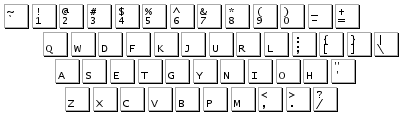
Norman is a conservative layout, placing a high priority on ease of transition from QWERTY. It keeps 70% of letters on the same fingers as QWERTY. Like Colemak and Workman, Norman preserves the ZXCV cluster for common shortcuts.
Since 2013, Norman has been included in xkeyboard-config, making it available by default on most Linux distributions.
Install
Section titled “Install”Kanata is a keyboard remapper that works on Windows, macOS, and Linux.
Install Kanata by following “Step 1: Set Up Kanata” in Nova’s Kanata setup guide:
Download the Kanata config file for Norman:
Make sure you know how to type your computer password using Norman.
Run Kanata with the downloaded config file and make sure the layout works as you expect:
kanata --cfg path/to/config.kbdTo have Norman activate whenever your computer starts up, follow the instructions to “Automatically start Kanata”:
There are two downloads available for macOS:
| Method | Admin Required | Notes |
|---|---|---|
| Native | Optional | Does not require 3rd party key remapping software. Admin is required to install for all users and use on first login. |
| Karabiner-Elements | Yes | Requires 3rd party key remapping software, including the installation of a Driver Extension. Allows for remapping of only specific keyboards. |
Download the .keylayout file for Norman:
Install the
.keylayoutfile:Copy the downloaded
.keylayoutfile to~/Library/Keyboard Layouts. Create the folder if it does not exist.Copy the downloaded
.keylayoutfile to/Library/Keyboard Layouts.Restart macOS.
Open System Settings.
Go to Keyboard → Text Input → Input Sources → Edit… and add your new Norman layout.
Press the “+” button at the bottom left.
Search for “Norman,” select your new layout, and press Add.
Install Karabiner-Elements:
Download the Karabiner rule file for Norman:
In Karabiner-Elements Settings, go to “Complex Modifications,” then press “Add predefined rule”at the top.
Make sure you know how to type your computer password using Norman.
Find the imported section named for the layout you downloaded, followed by “via Layouts.Wiki”, and enable the rule you want.
“All keyboards” remaps Norman onto all keyboards while connected to this computer. Select this reason unless you want to exclude some keyboards from remapping.
“Built-in keyboard only” remaps your device's built-in keyboard, as well as any other keyboard for which “Treat as built-in keyboard” (under the “Devices” section) is enabled. Select this option if you plan to map Norman onto an external keyboard using custom firmware.
To use Norman on the password entry screen before logging in, follow the official instructions: